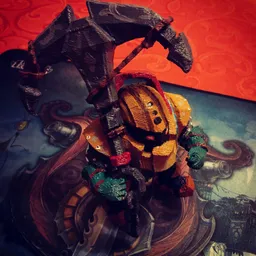
Extracting Veigar 3D models from League of Legends for 3D printing
In this video I want to explain how to extract a .stl file, which is used by 3D-printers, from the League of Legends character Veigar.
.stl file: https://megaup.net/13nC/veigar_Skin08.stl
Required programs and downloads:
Cinema4D
Photoshop CC
lol2dae: https://sourceforge.net/projects/lol2dae/
wooxy: https://mapskins.com/wooxy/
NVIDIA Texture Tools for Adobe Photoshop:
https://developer.nvidia.com/nvidia-texture-tools-adobe-photoshop
LeagueofLegends
I would recommend using a virtual machine to run all of those programs.
Wooxy might be detected by ur AntiVirus!
start wooxy and extract the folder with the champ u want on ur desktop
check the skin u want to use, by opening the .dds with Photoshop
open lol2dae and choose the path of ur .skn file of the champ
hit the checkbox to use an animation file and choose one
press convert and open the converted file in C4D
choose a nice looking frame and export it to .stl
control ur work with paint3D or similar
I hope this video helped u out with making a Lol statue, or inspired u to create one;)
music: https://www.youtube.com/user/Vexento
▶️ DTube
▶️ IPFS
Leave Extracting Veigar 3D models from League of Legends for 3D printing to:
Best Posts From peterpferd
We have not curated any of peterpferd's posts yet. But you can encourage our curation team to review posts by visiting them regularly and by referring other readers. Because we give priority to frequently read content.
More Posts From peterpferd
- Extracting Veigar 3D models from League of Legends for 3D printing
- 4️⃣2️⃣0️⃣ Prague
- Evening shot *_* - Prague
- Historical restored WW2 town in Germany at night! #coloured
- Welcome to Germany!
- Some Graffiti art in Bayreuth
- Good vibes on a rainy Sunday!
- Green Ireland
- Printing & painting my first 3D statue!
- Extracting 3D models from League of Legends for 3D printing