
how to fix microphone sound problem[Linux microphone parasite echo)
Hi my friend said that during the conversation it was the sound of echo and noise.I solved the problem like this.
- Open Terminal (ctrl + alt + t)
- write alsamixer and press enter
- The screen looks like the following
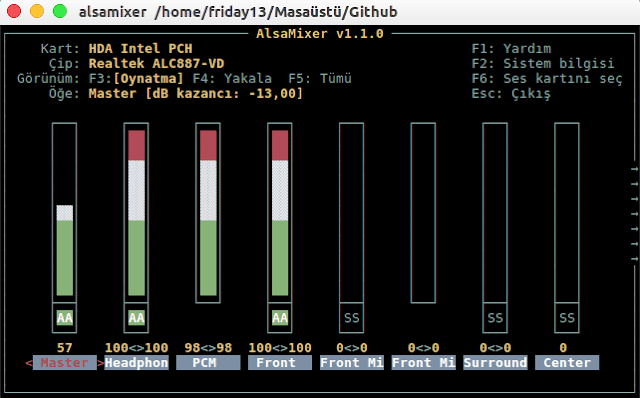
you can change your sound settings with the arrow keys and you can adjust your advanced settings by moving left and right.
F4 = Shows recording devices ie microphone and its variants.
F3 = Show playback devices
F5 = Show all audio devices.
F6 = Helps you choose your sound card
If you can not see the advanced settings, lets open terminal
sudo add-apt-repository ppa:ubuntu-audio-dev
sudo apt-get update
sudo apt-get dist-upgrade
then reboot the system. After the system is turned on,
sudo nano /etc/pulse/default.pa
finding echo a line and add
load-module module-echo-cancel
Then enter the sound settings, the option will come out
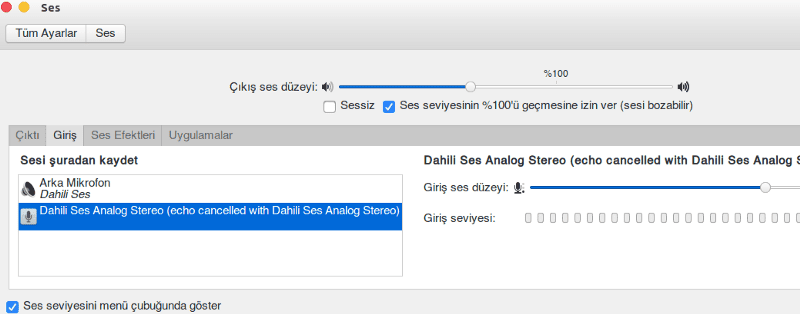
echo cancel
resolved ;)
Leave how to fix microphone sound problem[Linux microphone parasite echo) to:

Best Posts From Elon Tusk
We have not curated any of fatdog's posts yet. But you can encourage our curation team to review posts by visiting them regularly and by referring other readers. Because we give priority to frequently read content.
More Posts From Elon Tusk
- Linux Gamer Now Live
- Dj Tehlikeli Madde
- Dj Tehlikeli Madde
- Greatest Ubuntu Derivatives in 2018
- 5 Greatest GitHub Alternate options open source project
- Finest Laptops for Arch Linux
- Kali Linux can now be downloaded from Microsoft W10
- Set up Flatabulous Theme On Ubuntu And Derivatives
- Why I Love Arch Linux
- Jekyll Blog Installation on Linux