Published: 03 May 2018 › Updated: 03 May 2018
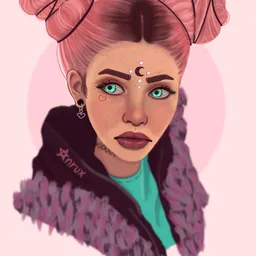
Digital Portrait - Process (WITHOUT GRAPHIC TABLET)
Hello community, this afternoon I made a semi realistic portrait and I want to share with you how I made it. I remind you that I make the digital drawings in an ordinary tablet with the MediBang Paint application that can be downloaded for free in the Google Play Store.
1. This time I didn't made an sketch, I began adding spots, giving shape, little by little, to the structure of the head and neck.
2. Then I made the mouth, nose, eyes and eyebrows. I also added details on the neck.
3. Then I focused on the hair. Adding shadows and lights giving it the shape I wanted. I also fixed some details of the work in general and also added more lights on the face and neck.
4. Finally, with a photo editor, I increased the brightness of the image a little and I used a filter on it.
❤ Face details ❤
I hope you liked my post. With it I want to show you don't need to have a drawing tablet to get good results making drawings or digital illustrations. You can support me by voting for the post and leaving me comments :3
❤ Thank you very much! ❤
Leave Digital Portrait - Process (WITHOUT GRAPHIC TABLET) to:

Best Posts From ♡ Anrux ♡
We have not curated any of anrux's posts yet. But you can encourage our curation team to review posts by visiting them regularly and by referring other readers. Because we give priority to frequently read content.
More Posts From ♡ Anrux ♡
- Alma de girasol - Fotografía
- WIP Angelical + I'm back after several weeks
- WIP Angelical + De vuelta después de varias semanas
- Daniel - Portrait ❤
- Daniel - Retrato ❤
- Chibi Unicorn Girl + COMMISSIONS OPEN
- Chica Unicornio Chibi + COMISIONES ABIERTAS
- Tatiana - SPEEDPAINT (Paint tool Sai) [EN]
- Tatiana - SPEEDPAINT (Paint tool Sai) [ES]
- Process of an animated GIF (WITH MOUSE)
- Proceso de un GIF animado (CON MOUSE)
- Dotpict (App to make Pixel Art) - Tutorial + Review
- Dotpict (App para hacer Pixel Art) - Tutorial + Reseña
- Making a Digital Illustration with MOUSE / TOUCHPAD
- Haciendo una Ilustración Digital con MOUSE / TOUCHPAD
- Digital Portrait - Process (WITHOUT GRAPHIC TABLET)
- Retrato Digital - Proceso (SIN TABLET DE DIBUJO)
- ArtzOne Logo Contest
- Character Design - Erika (WITHOUT GRAPHIC TABLET)
- Diseño de personaje - Erika (SIN TABLET DE DIBUJO)