
[Tutorial]: Ionic Tutorials (Lazy Loading and How it affects performance)
Repository: Ionic Github Repository
Software Requirements:
Visual Studio Code(Or any preferred code editor)
What you will learn:
In this tutorial you would learn about lazy loading using the browser module coveering these major concepts
- Learn how to use the
browser modulein ionic. - Learn how to boost performance using lazy loading
- Learning how to migrate to lazy loading.
Difficulty: Intermediate
Tutorial
In this tutorial we would be dealing with a very critical aspect of any ionic developers development process which is lazy loading. For large apps with a lot of pages, without lazy loading it is almost certain that there would be a start-up lag.
First What is Lazy Loading?
Lazy loading in ionic was adopted from angular's lazy loading which was used to load images as they are needed so as to reduce the processing intensity of the device.
Lazy loading simply means creating pages or any components whenever they are needed and destroying them when they aren't needed. For a big app of about 10 or 20 pages, trying to load all at start-up would most certainly cause a lag and so it is better to load only the pages that would be used on startup. This would mean that you would load your login(if you have one) and maybe you tabs. This would go a long way in increasing the performance of your application.
So lets get coding
We'll start up with a project with a page that isn't lazy loaded and i'll walk you through lazy loading this page. Note however that in ionic 4, Lazy loading is quite different and more innate to the update. You could see a single paged minimized code for this tutorial on my github page at the end of the tutorial.
Well start with a home page generated with a tabs starter template.
To do that i would assume you already have ionic installed so simply head to you terminal and type
ionic start LazyLoading tabs//Note that 'LazyLoading is the name of the project and doesnt affect the way the project is generated
So you should have a started template
Head to your terminal and type
ionic g page newPage//This would generate a new page called 'newPage'
The thing about ionic 3 is that it automatically generates pages lazily loaded when you generate them with the terminal
Lets look at this newly generated lazy loaded page and what makes it lazy loaded.
Navigate to this directory
src/app/pages/newPage
They would be four files inside the directory
The difference between is in the fourth file which is newPage.module.ts
This is the file that gives the page its independence. Pages that aren't lazy loaded are input directly to the app.module.ts. But when pages are lazy loaded, they have their own module which generates them immediately when needed.
Lets look into the structure of this file
import { NgModule } from '@angular/core';
import { IonicPageModule } from 'ionic-angular';
import { NewPage } from './new';
@NgModule({
declarations: [
NewPage,
],
imports: [
IonicPageModule.forChild(NewPage),
],
})
export class NewPageModule {}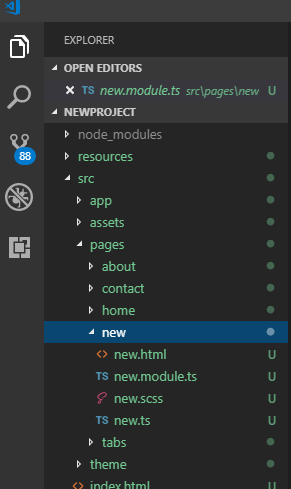.png)
We see that the page exports an instance of itself to the app through this module.
Also you have to take note that in a lazy loaded page the newPage.ts file is decorated with the @IonicPage. Which can be imported from ionic-angular. Without this the page would not be read as a lazy loaded page.
The next thing you would need to know about lazy loading takes us to our app module
Note: This step would be very useful if you would want to migrate a fully normal app to a lazy loaded app. In newer releases of ionic 3(meaning that you generated the page more recently this wouldnt be needed). But you should check however.
Head to the directory below
src/app/app.module.ts
This is how it should look
import { NgModule, ErrorHandler } from '@angular/core';
import { BrowserModule } from '@angular/platform-browser';//This is the module related with lazy loading
import { IonicApp, IonicModule, IonicErrorHandler } from 'ionic-angular';
import { MyApp } from './app.component';

import { AboutPage } from '../pages/about/about';
import { ContactPage } from '../pages/contact/contact';
import { HomePage } from '../pages/home/home';
import { TabsPage } from '../pages/tabs/tabs';

import { StatusBar } from '@ionic-native/status-bar';
import { SplashScreen } from '@ionic-native/splash-screen';

@NgModule({
  declarations: [
    MyApp,
    AboutPage,
    ContactPage,
    HomePage,
    TabsPage
  ],
  imports: [
    BrowserModule,
    IonicModule.forRoot(MyApp)
  ],
  bootstrap: [IonicApp],
  entryComponents: [
    MyApp,
    AboutPage,
    ContactPage,
    HomePage,
    TabsPage
  ],
  providers: [
    StatusBar,
    SplashScreen,
    {provide: ErrorHandler, useClass: IonicErrorHandler}
  ]
})
export class AppModule {}
As you can see in the comment in the above code. You would take note of the BrowserModule which is an angular style module that navigates to pages similarly to the way a browser would navigate to pages based on url's
**Navigating to a lazy loaded pageAs per ionic, navigation is carried out by thenavCtrl`` which is by default in the contructor of every generated page. Just as stated above the navigation for lazy loaded pages is more angular style. Which uses url paths.
To navigate to this newPage from the any other page we would need to state the page as a string
For instance to navigate to our new Lazy loaded page we would simply use this line of code
this.navCtrl.push('NewPage')
The beauty of this is that there is no need for any imports into any page or any module. The Browser module fixes this for us.
As seen above this uses the url path and adds that page to the stack . Simple and Easy.
You can find the minified code for this in my GIthub
Leave any comments below
Leave [Tutorial]: Ionic Tutorials (Lazy Loading and How it affects performance) to:

Best Posts From Yalzeee
We have not curated any of yalzeee's posts yet. But you can encourage our curation team to review posts by visiting them regularly and by referring other readers. Because we give priority to frequently read content.
More Posts From Yalzeee
- Hello Steemit
- Ionic 4: Designing a DOM friendly expandable header bar
- Ionic 4: Implementing Hold and Press multiple select feature in ionic 4
- Ionic Tutorials: Sorting modules in ionic 4
- [Ionic/Electron]: Making windows,mac and debian installers with Electron Forge
- Ionic Tutorials: Working with electron(API's)
- Ionic Tutorials: Finishing an ionic application
- Ionic Tutorials: Setting Up Your In-App Settings for an Ionic app
- [Ionic Tutorials](How to manage various platforms in your ionic app)
- Ionic Tutorial: Using Firestore Collections and Firestore documents in you ionic app